Introduction — v4.5

Give Your Clients AI.
Without the
Complexity.

ZaronAI lets IT shops and agencies drop a fully-configured, multi-agent AI system into any client web page — using a single line of JavaScript. No AI expertise required.

1
Line of code
5 +
Agent pipeline
GPT‑5
Ready now
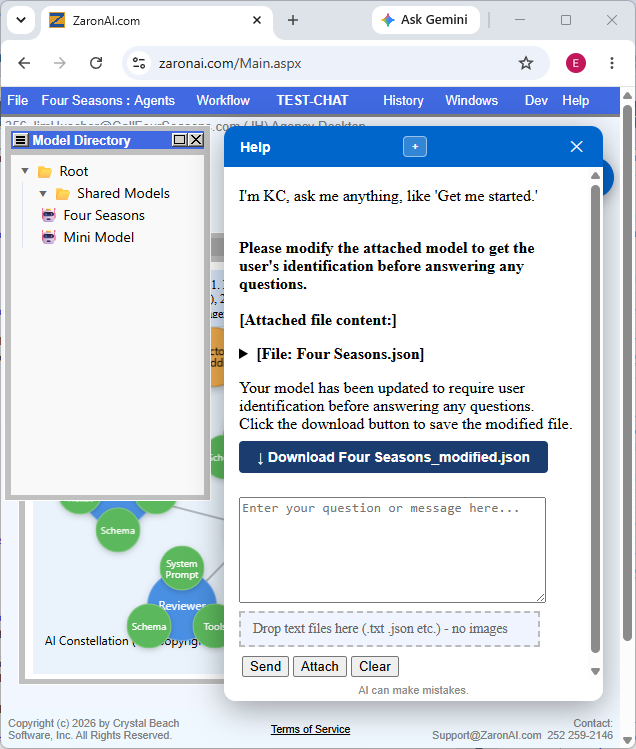
ZaronAI split-screen
Visual Workflow Builder
Multi-Agent Pipelines
Zero AI Expertise Needed
Embeddable in Minutes
OpenAI GPT-4.1 / GPT-5
Shared Models Across Clients
Embed

One Line.
Full AI
Experience.

Once you’ve configured your AI Model in ZaronAI, deploying it to any client site is a single script tag. The chat widget loads, connects, and runs — fully styled, fully functional.

Start Building ›
client-website / index.html
<!-- Add ZaronAI to any page -->
<script
  src="https://zaronai.com/chat.js"
  model_password="YourModelPassword"
  data_position="top-right"
  data_width="400"
  data_height="600"
  data_theme="light"
  data_footnote="AI can make mistakes."
></script>

<!-- That’s it. Your AI is live. -->
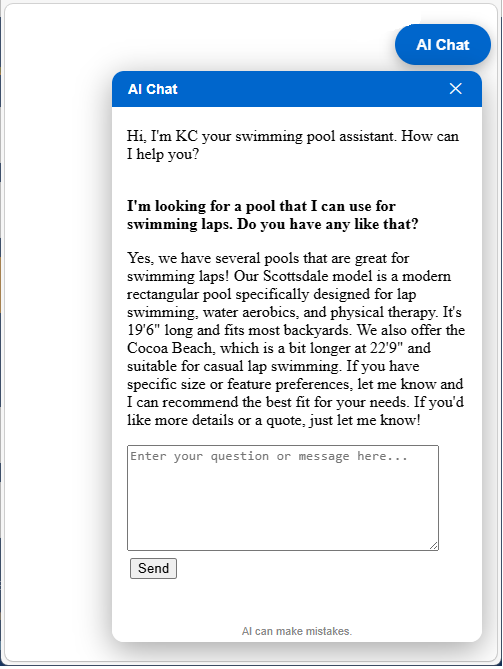
ZaronAI chat widget live on client site
↑  Live on client site
How It Works Architecture Workflow Who It’s For Quick Start Pricing
Process

From Zero to AI
in Four Steps.

You don’t write AI code. You configure a Model, assign Agents, define the Workflow — then hand your client a script tag.

01

Create a Model

Register your client as an Owner and set up a Model in the ZaronAI dashboard. Models can be shared across multiple clients to save setup time.

02

Configure Agents

Each Agent gets a system prompt, tools (Knowledge Base, Caller Capture, Send Ticket), and a response schema. Click any node in the visual graph to edit inline.

03

Design the Workflow

Connect Agents into a Pipeline: Router → Sales or Service → Reviewer → Finalizer. Set advance criteria, exit guards, and branching logic visually.

04

Embed & Launch

Paste the one-line script into your client’s page. The widget appears, connects to your configured pipeline, and starts handling visitors immediately.

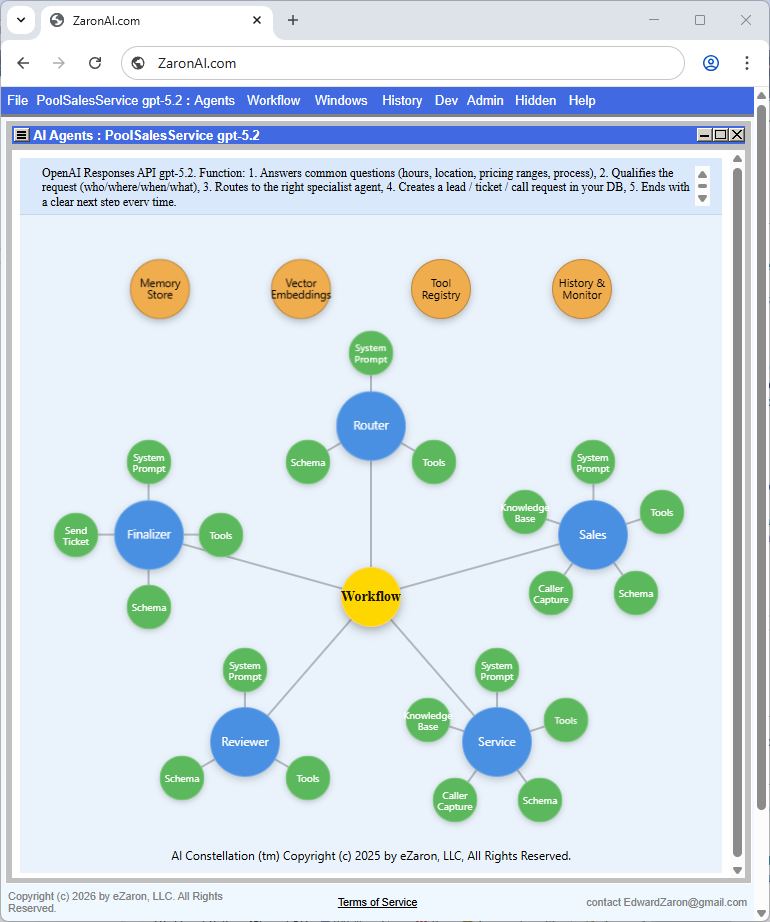
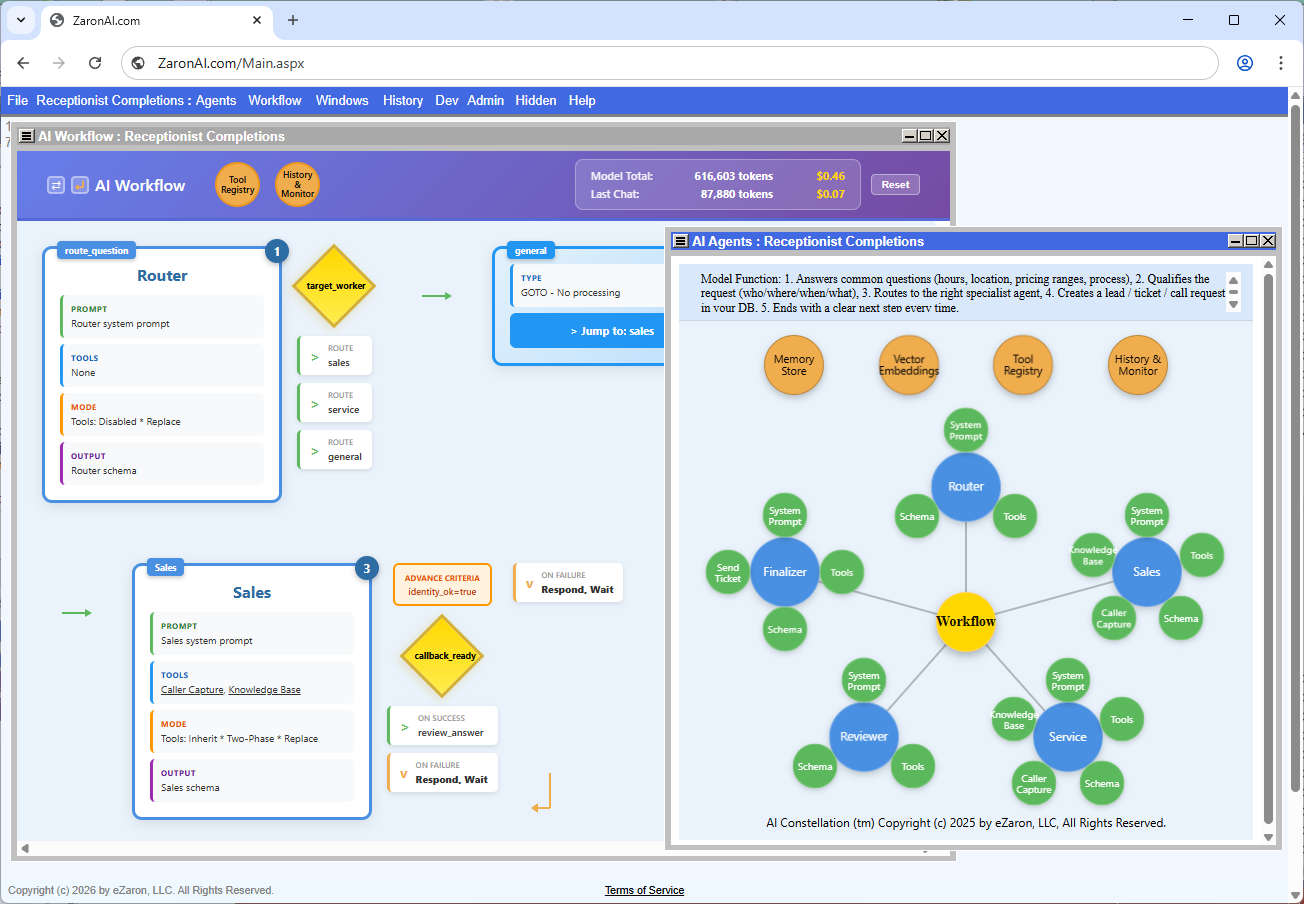
ZaronAI AI Agents constellation diagram
Architecture

A Clean
Four-Level
Hierarchy.

Everything in ZaronAI descends from a simple tree. Each level is independently configurable — click any node in the visual graph to drill into its properties, prompts, tools, and schema.

👤
Owner
Your agency or client account. Owns API keys, billing, and shared Models.
📦
Model
A complete AI system: Agents, Workflow, Knowledge Base, Tool Registry. Shareable across Owners.
Workflow (Pipeline)
Orchestrates Agents in sequence with routing logic, advance criteria, exit guards, and a final answer step.
🤖
Agent
A single AI role — Router, Sales, Service, Reviewer, or Finalizer — with its own prompt, tools, and schema.
Workflow Designer

See Exactly How
Your AI Thinks.

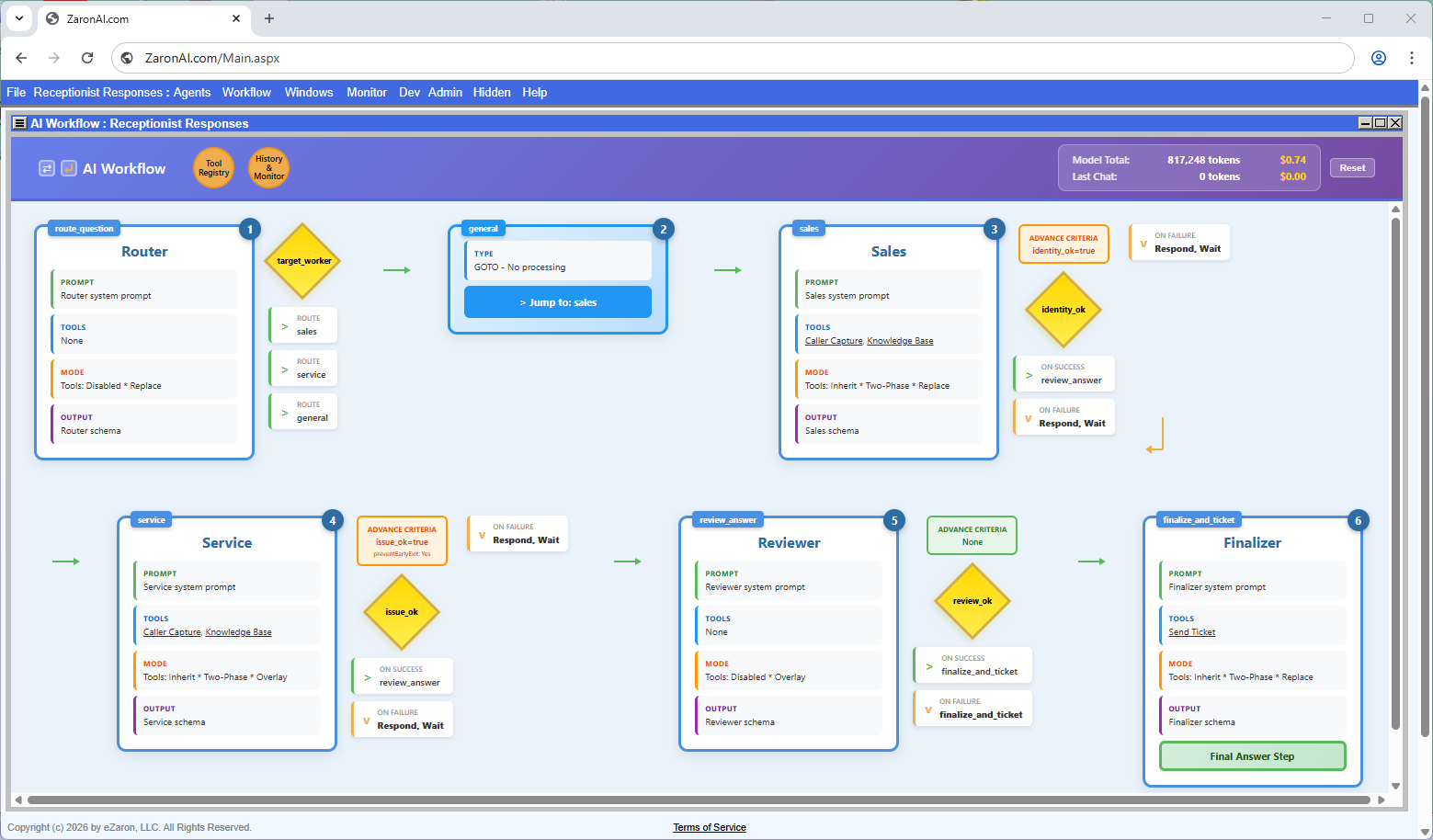
The AI Workflow view shows every Pipeline step as a card — its prompt, tools, mode, output schema, advance criteria, and branch targets. No guessing. No black box.

ZaronAI workflow pipeline
Router Step

Classifies the question as sales, service, or general and routes to the correct specialist Agent automatically.

Advance Criteria

JSON conditions that must be true before advancing — e.g. identity_ok=true. Unmet criteria hold the conversation and loop back to the user.

Exit Guard

If a visitor tries to leave before required info is collected, the guard intercepts politely and holds the conversation in place.

Two-Phase Execution

Each step runs a tools pass (save info, query KB) then a schema pass (structured JSON) for clean, reliable output.

Reviewer Agent

An optional quality gate that evaluates the previous Agent’s draft answer before it reaches the user or triggers the Finalizer.

Finalizer & Ticketing

The last step assembles the final reply, creates a service ticket, and triggers SMS/email notifications via the Send Ticket tool.

Audience

Built for the Builders
Behind the Curtain.

You don’t need to be an AI researcher. You need to deliver results for your clients, fast.

🏢

Small IT Houses

Add AI to client contracts without hiring AI specialists. Configure once, resell as a managed service.

  • Receptionist & support bots
  • Lead capture pipelines
  • Service ticket automation
  • Multi-client shared models
🎨

Digital & Ad Agencies

Make every client site interactive and intelligent. Fits the same delivery pipeline as your existing web builds.

  • Branded AI chat widgets
  • Product recommendation agents
  • Campaign inquiry capture
  • Dark theme & custom styling
🔧

Independent Developers

Skip months of AI architecture. Get a production-ready multi-agent system to customize and deploy in hours.

  • Visual pipeline editor
  • JSON schema response control
  • Full DB-level configuration
  • GPT-4.1-nano to GPT-5 support
Quick Start

Five Steps to Your
First AI Client.

01

Create Account

Register at ZaronAI.com and add your OpenAI API key under Private Access Keys.

02

Open a Model

Use Receptionist Responses as your starting template or create a new Model from scratch.

03

Edit Agents

Click any Agent node to update its system prompt, tools, and advance criteria.

04

Test Workflow

Use the built-in chat window to verify routing, tool calls, and final answers.

05

Embed & Ship

Copy the one-line script tag. Paste into your client’s page. Done.

Pricing

Free to Learn.
Affordable to Deploy.
Valuable from Day One.

ZaronAI is built so you can learn the platform, build models, and prove the value to your clients before any commitment. When you’re ready to put a customized model on a live customer site, the cost stays small and predictable.

🔎

Explore

Free1M tokens to start*

The full platform is free for learning and experimentation. Build models, configure agents, run live test chats — no card, no commitment.

  • Full dashboard access
  • All Agent and Tool features
  • 1,000,000 free OpenAI tokens to start
  • Add your own OpenAI key to keep going
🚀

Deploy

$99per month, per deployed model

When a customized model is deployed to a customer’s website, the ZaronAI platform fee is $99 monthly per model. This covers the runtime, the chat widget, ticket generation, the knowledge base, conversation logs, and ongoing dashboard access.

ZaronAI is designed to be configured and deployed by an IT professional or digital agency. Direct self-deployment is supported, but most successful deployments are partner-led. The $99 platform fee is the runtime cost — your partner adds the configuration, the vertical knowledge, the ongoing tuning, and the relationship.

  • Live chat widget on the customer site
  • Service ticket generation and email delivery
  • Knowledge base and pipeline runtime
  • Conversation logs and analytics

Looking for a partner? See zaronai.com/partners.

📱

SMS Notifications — Optional

Twilio Ratesbilled direct to your account

To send SMS alerts to the business owner when tickets are generated, register a Twilio account and connect it in your dashboard. Twilio bills you directly — typical small-business usage runs only a few dollars per month.

  • Owner receives SMS the moment a ticket is captured
  • Twilio account registered in your name
  • Pay Twilio directly, no markup
  • Toll-free or local number, your choice
* Free token allowance is current as of launch and may be adjusted. Once consumed, add your own OpenAI API key under File › Private Access Keys to continue at OpenAI’s published rates.

Introduction — v4.5 Concepts Guide →

Ready to Add AI
to Every Client Site?

Start with the Receptionist Responses model and have your first AI deployment running today.

*Free trials may be limited by time, features, and usage caps, and are subject to change without notice.