Concepts Guide — v1.0

How ZaronAI Works.

Prompts, schemas, tools, pipelines, memory and advance criteria — the core ideas behind every ZaronAI deployment, explained clearly for developers who know code but are new to AI.

AudienceSemi-technical developers
CoversCore AI concepts
NextCookbook ›
The Big Idea System Prompts Schemas Tools The Pipeline Memory & Context Advance Criteria Two-Phase Execution Key Terms
Overview

The Big Idea

ZaronAI is a multi-agent orchestration platform. Instead of one AI trying to handle every situation, ZaronAI routes each conversation through a team of specialized AI agents — each one focused on a single job.

Think of it like a well-run reception desk. The front desk (Router) figures out what you need and sends you to the right person. The specialist (Sales or Service agent) handles your actual request. A quality reviewer checks the answer. And the Finalizer wraps it up cleanly and creates a ticket if needed.

Each agent in this team is powered by an OpenAI GPT model, configured with a system prompt that defines its personality and role, tools it can call, and a schema that defines exactly what it must return.

🎯

Specialized Agents

Each agent has one job. The Router routes. The Sales agent sells. The Reviewer reviews. Focused agents outperform generalist prompts.

🔗

Orchestrated Pipeline

A Workflow connects agents in sequence. Each step passes its output to the next. Routing, branching, and exit logic are all configurable without code.

📋

Structured Output

Agents return JSON, not free text. Every field is defined by a schema. This makes agent-to-agent handoffs reliable and machine-readable.

Core Concept 01

The System Prompt

The system prompt is the agent’s instruction manual. It defines who the agent is, what it knows, how it should behave, and what it must never do.

Every agent in ZaronAI has its own system prompt. The Router’s prompt teaches it to classify questions. The Sales agent’s prompt gives it product knowledge and a sales personality. The Reviewer’s prompt makes it critical and precise.

System prompts are stored in the database and editable at any time without redeployment. Click any agent node in the AI Agents view to edit its prompt directly.

Good to know

The system prompt is always message #1 in the conversation history. OpenAI processes it before every user message, so changes take effect immediately on the next conversation — no restart required.

Service Agent — System Prompt (excerpt)
// Role definition You are the Service Agent for Acme Pool Company. Your job is to understand the customer's pool issue and collect enough detail to create a service ticket. // Behavior rules - Always confirm the issue type before asking for contact info. - Never quote prices or availability directly. - Collect: name, phone or email, street address, issue description. // Tone Friendly, professional, concise. No more than 3 sentences per reply.
🖼 Screenshot: Agent property page — System Prompt tab
Core Concept 02

Response Schemas

A schema tells the AI exactly what JSON structure to return. Not a suggestion — a contract.

Without a schema, an AI returns free-form text — useful for a chat window, but unpredictable for a pipeline where the next agent needs to read specific fields. ZaronAI uses OpenAI’s structured output feature to enforce schema compliance.

Every pipeline agent has its own schema. The Router’s schema requires a route field. The Service agent’s schema requires a messageToUser, an issue_ok boolean, and a identity_ok boolean. The Finalizer’s schema drives the ticket fields.

Why this matters

When agent output is structured JSON, the pipeline can read issue_ok=true and decide to advance automatically. Free text would require another AI call just to interpret the answer. Schemas eliminate that entire layer of complexity.

Service Agent — Response Schema
{ "messageToUser": "string", // What the user sees "issue_ok": boolean, // Issue fully described? "identity_ok": boolean, // Contact info collected? "issue_type": "string", // e.g. "leak", "pump", "algae" "issue_detail": "string", // Customer description "contact_name": "string", "contact_phone": "string", "contact_email": "string" }
Core Concept 03

Tools — What Agents Can Do

Tools are functions an agent can call during a conversation. The AI decides when and whether to call them. ZaronAI executes them server-side and returns the result to the AI.

💾

save_user_info

Saves caller identity to the database — name, phone, email, address. Returns what’s still missing so the agent knows what to ask next. Designed to be called incrementally as the user provides information.

📚

retrieve_kb_entries

Searches the Knowledge Base by keyword and returns the most relevant entries with confidence scores. Uses lexical scoring — deterministic and fast, no embeddings required.

🎫

finalize_send_ticket

Creates the service or sales ticket record, queues it for processing, and triggers notifications (SMS, email) based on the ticket type and client configuration.

How tool calling works

When an agent decides to call a tool, it returns a special tool_calls response instead of a text answer. ZaronAI intercepts this, runs the tool function locally, and sends the result back to the AI in the next message. The AI then continues its reply with the tool result in context. This loop repeats up to maxToolRounds times per step.

Core Concept 04

The Pipeline — How Agents Connect

A Pipeline is the Workflow that connects agents in sequence. Each step hands its output to the next until the conversation reaches a Final Answer step.

Step 1 Router

Classifies the question.
Returns route: "sales"
or "service".

Step 2 General Goto

A no-op step that directs
general queries back to
the last active route.

Step 3 Sales / Service

Handles the conversation.
Calls tools. Collects info.
Returns structured JSON.

Step 4 Reviewer

Checks the draft answer.
Returns review_ok: true
to advance or retry.

Step 5 Finalizer

Assembles the final reply
and fires the
Send Ticket tool.
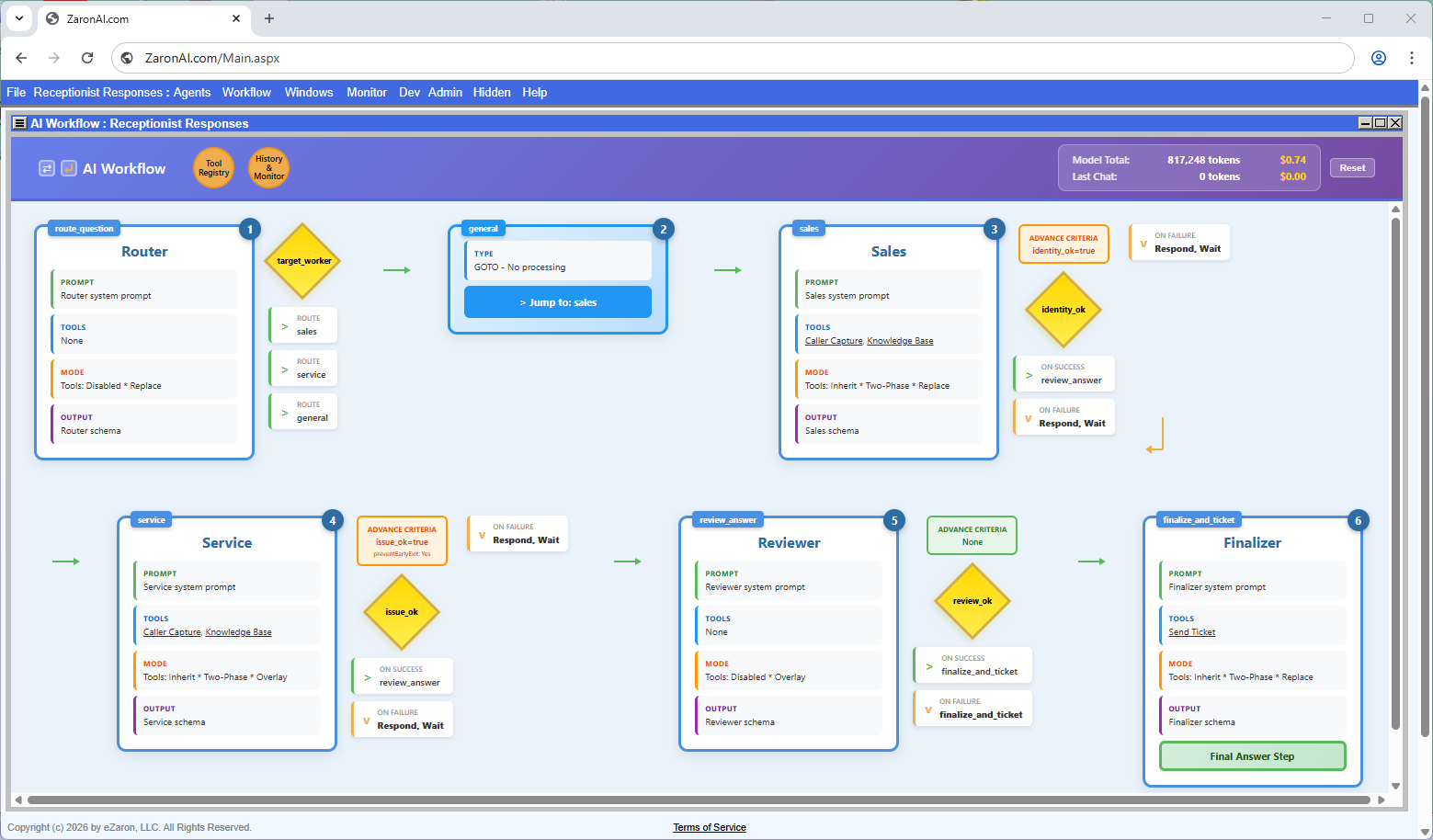
🖼 Screenshot: AI Workflow view — full horizontal pipeline
Routing & Branching

Each step has a nextStepOnSuccess and nextStepOnFailure label. The pipeline jumps to the matching step based on the outcome field in the agent’s JSON response. A Router step reads a route field instead and jumps directly to the named step label.
Core Concept 05

Memory & Context

AI models have no built-in memory between calls. ZaronAI manages memory by controlling which messages are included in each API request.

Every message in a conversation is stored in the chatMessages table with an includeInContext flag. When building the next API request, ZaronAI loads only the messages where this flag is true — in order — giving the AI a complete picture of the conversation so far.

Tool results marked persistToolOutput = true are saved back into the message history as assistant messages. This means a subsequent agent can read what a tool returned in an earlier step — for example, the user’s saved contact info from save_user_info.

The critical fix

Pipeline user messages use includeInContext = true so that when the same user sends a follow-up message, the agent remembers what was already collected. Without this, agents ask for the same information repeatedly.

chatMessages — context loading query
SELECT * FROM chatMessages WHERE chatHdrPkey = @id AND recordactive = 1 AND includeInContext = 1 ORDER BY pkey -- Message sequence sent to OpenAI: -- 1. system (agent prompt) -- 2. user (prior messages) -- 3. assistant (prior replies) -- 4. tool (tool results) -- 5. user (current message)
Role Purpose
systemAgent instructions. Always first.
userWhat the visitor said.
assistantWhat the AI replied, or tool memory.
toolResult returned by a tool call.
Core Concept 06

Advance Criteria

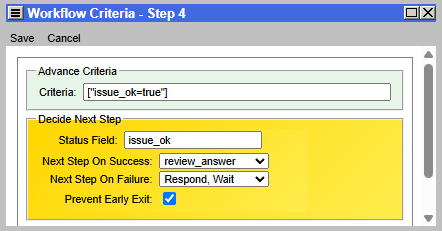
Advance criteria are the conditions that must be true in an agent’s JSON response before the pipeline moves to the next step.

Think of them as a checklist at the exit of each step. If the checklist isn’t complete, the pipeline holds at that step and sends the agent’s reply back to the user, waiting for more information.

Criteria are stored as a JSON array of simple expressions on the pipeline step record. ZaronAI evaluates each one against the agent’s response JSON after every turn.

pipelineSteps.advanceCriteria
// Service step: both must be true [ "issue_ok=true", "identity_ok=true" ] // Sales step: identity only [ "identity_ok=true" ] // Reviewer step: review passed [ "review_ok=true" ]

The Exit Guard

When preventEarlyExit = true is set on a step, ZaronAI also watches for departure phrases in the user’s message — words like “bye”, “thanks”, “gotta go”.

If the advance criteria aren’t met and a departure intent is detected, ZaronAI appends a polite reminder to the agent’s response listing what is still needed before the conversation can close.

Real-world example

A pool service visitor describes their pump problem but then says “thanks, I’ll wait to hear from you.” The exit guard catches the departure intent, sees that identity_ok=false, and appends: “Before we finish, I still need your name and a phone number or email.”

🖼 Screenshot: Pipeline step — Advance Criteria panel
Core Concept 07

Two-Phase Execution

Some pipeline steps run twice: once to call tools, and once to produce a structured JSON response. This is called two-phase execution.

The problem it solves: when an agent is forced to return a strict JSON schema, OpenAI prioritizes the schema and may skip tool calls. And when tools are active with tool_choice: required, the agent may not produce the schema output cleanly.

Two-phase execution separates these concerns:

Phase 1 — Tools Pass

Tools are enabled. The agent calls save_user_info, retrieve_kb_entries, or any other tool. Side effects happen. Tool results are persisted to conversation memory.

Phase 2 — Schema Pass

Tools are disabled. The agent reads the full conversation history including Phase 1 tool results, then produces a clean structured JSON response with all required fields.

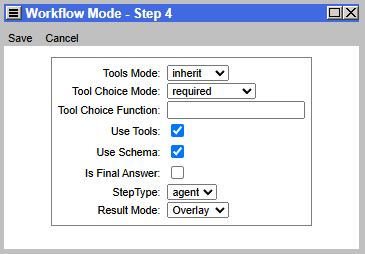
Enable two-phase on a step by setting both useTools = true and useSchema = true on the pipeline step record. Steps with only one flag use single-phase execution.

🖼 Diagram: Two-phase execution flow — Phase 1 tools, Phase 2 schema
Result modes

Each step also has a resultMode setting. Replace (0) — the step’s output replaces the prior step’s output. Overlay (1) — the step’s output is merged onto the prior output, preserving any fields not returned by the current step. Overlay is ideal for agents that progressively fill in a shared data envelope.

Reference

Key Terms at a Glance

Quick reference for the terms used throughout this guide and across all ZaronAI documentation.

Term Meaning
AgentA single AI role with its own system prompt, tools, and schema. Powered by an OpenAI GPT model.
PipelineThe Workflow — an ordered sequence of agent steps that processes each user conversation.
StepOne agent invocation within the pipeline. Has a label, type, advance criteria, and branch targets.
System PromptThe instruction set given to an agent before the conversation starts. Defines role, tone, and rules.
SchemaA JSON structure definition that the agent must follow when returning its response.
ToolA server-side function the agent can call (save_user_info, retrieve_kb_entries, finalize_send_ticket).
Advance CriteriaField conditions in the agent’s JSON response that must be satisfied before the pipeline advances.
Exit GuardDetects departure intent and reminds the user what is still required before closing.
Two-PhaseRunning a step twice: tools pass first, schema pass second, for clean structured output.
OverlayA resultMode where a step merges its output onto the prior step’s output rather than replacing it.
includeInContextA flag on each chatMessage that controls whether it is sent to OpenAI in the next API call.
chatHdrPkeyThe session key for a single visitor conversation. Links all messages, tool calls and agent activity.
RouterThe first pipeline agent. Reads the user’s question and returns a route label to direct the pipeline.
FinalizerThe last pipeline agent. Produces the final user-facing reply and triggers ticket creation.
← Introduction Concepts Guide — v1.0 Cookbook →